ElasticSearch是一个基于 Lucene 的分布式搜索引擎,业内简称ES。它提供了基于 RESTful 风格的全文搜索API。Elasticsearch 是用 Java 开发的,并作为 Apache 许可条款下的开放源码发布,是当前最流行的企业级搜索引擎。另外,它的分布式设计让它天生就适合用于云计算中,并能够达到准实时搜索,而且安装使用方便,还拥有稳定,可靠,快速等特性。本文是我对 ES 的一个完整记录,方便后期查阅。另外大家还可以查阅更多的相关资料对 ElasticSearch 有更深入的了解。
1. 安装
1.1. 单机安装
ElasticSearch 要求本地的 JDK 版本不低于1.8
-
去官网下载最新版的 ES 软件包 https://www.elastic.co/downloads/elasticsearch ,目前 ES 最新版本为6.1.1,我这里采用 wget 命令在终端下载
cd apps wget https://artifacts.elastic.co/downloads/elasticsearch/elasticsearch-6.1.1.tar.gz -
如果出现
command not found: wget,如果是 Linux,可以用yum install -y wget下载,如果是 Mac 就可以用brew install wget下载 -
检查本地 JDK 版本,必须保证为1.8版本以上
$ java -version java version "1.8.0_131" Java(TM) SE Runtime Environment (build 1.8.0_131-b11) Java HotSpot(TM) 64-Bit Server VM (build 25.131-b11, mixed mode) -
解压软件包
tar -zxvf elasticsearch-6.1.1.tar.gz -
启动 ES
cd elasticsearch-6.1.1 ./bin/elasticsearch -
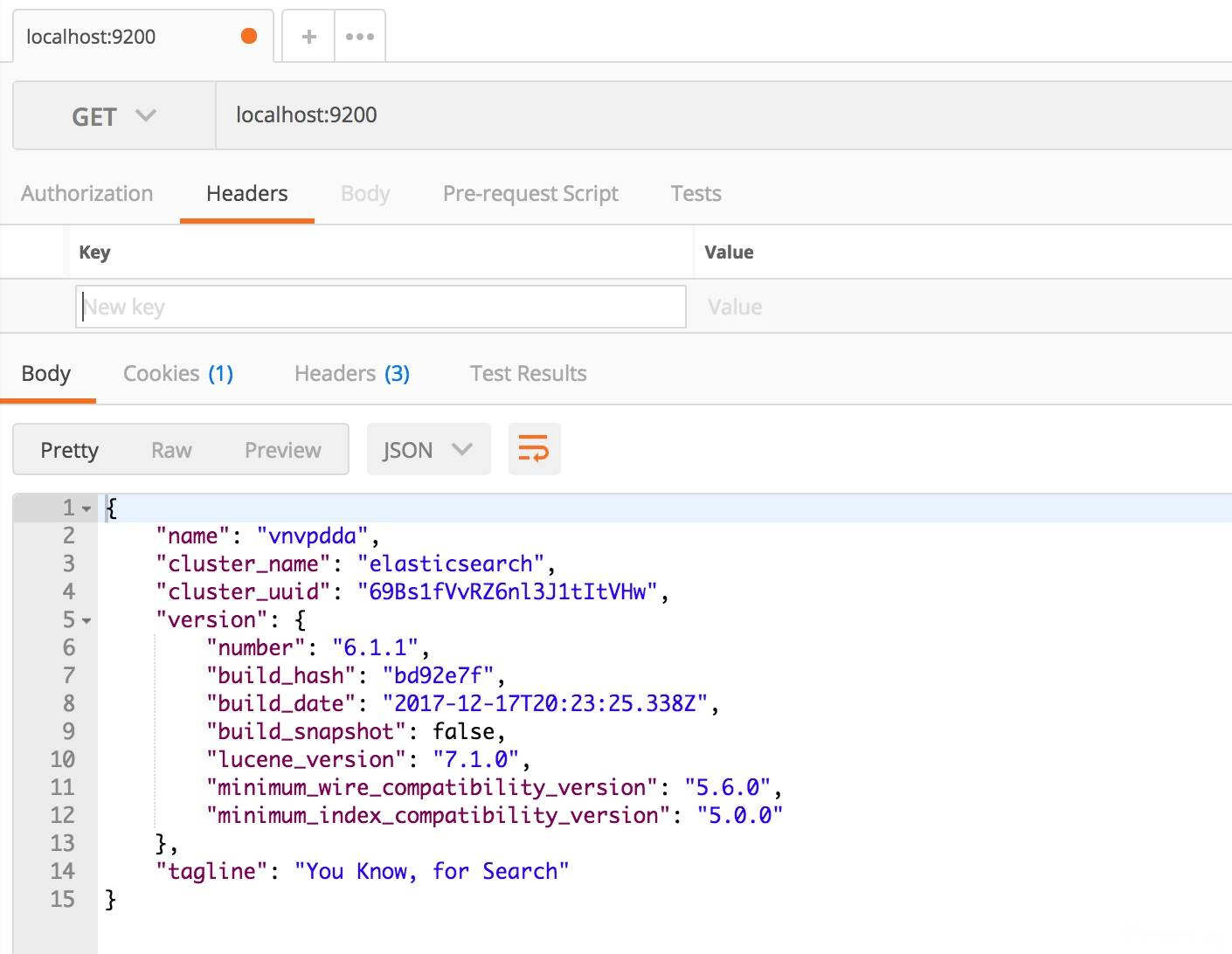
测试,打开 PostMan 测试 http://localhost:9200 ,查看返回的 JSON 信息
1.2. 分布式安装
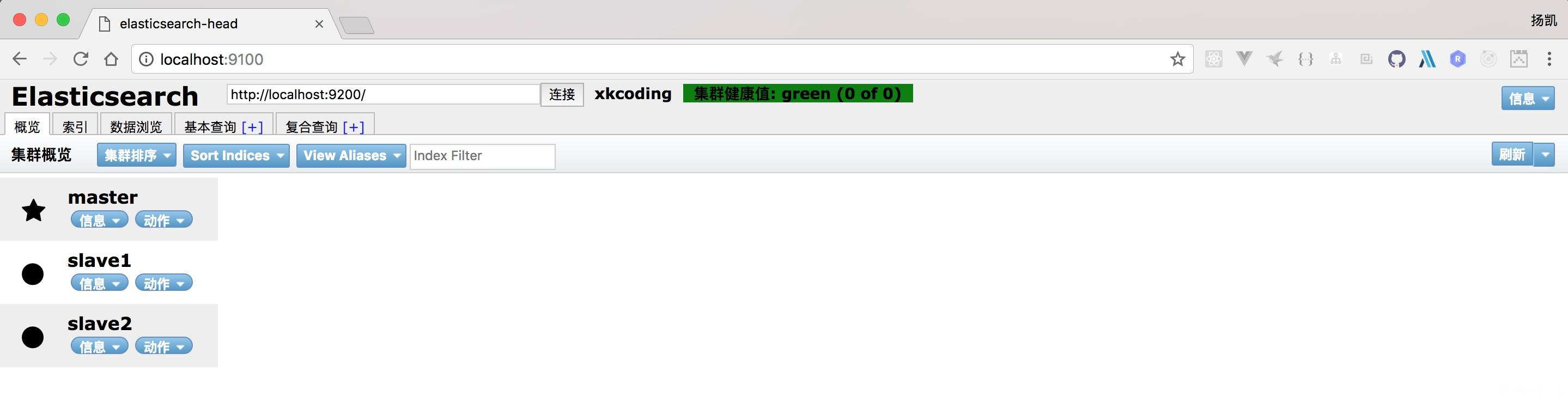
这里我会在本地启动3个 ES 节点,分别用不同的端口号来模拟分布式的环境,一个节点为 master,另外两个节点为 slave 节点。
-
下载安装包,解压3份,分别命名为
elasticsearch-master,elasticsearch-slave1,elasticsearch-slave2 -
修改
elasticsearch-master的配置文件,config/elasticsearch.ymlhttp.cors.enabled: true http.cors.allow-origin: "*" ## 用于指定集群名称 cluster.name: xkcoding ## 用于指定节点名称 node.name: master ## 用于指定当前节点是 master 节点 node.master: true network.host: 127.0.0.1 http.port: 9200 -
修改
elasticsearch-slave1的配置文件,config/elasticsearch.ymlhttp.cors.enabled: true http.cors.allow-origin: "*" ## 用于指定集群名称 cluster.name: xkcoding ## 用于指定节点名称 node.name: slave1 network.host: 127.0.0.1 http.port: 8200 ## 用于发现 master 节点 discovery.zen.ping.unicast.hosts: ["127.0.0.1"] -
修改
elasticsearch-slave2的配置文件,config/elasticsearch.ymlhttp.cors.enabled: true http.cors.allow-origin: "*" ## 用于指定集群名称 cluster.name: xkcoding ## 用于指定节点名称 node.name: slave2 network.host: 127.0.0.1 http.port: 7200 ## 用于发现 master 节点 discovery.zen.ping.unicast.hosts: ["127.0.0.1"] -
启动 head 插件,打开浏览器,访问 http://localhost:9100,查看分布式节点的运行状态
1.3. 插件安装
1.3.1. head 插件
独立安装
独立安装是指,head插件安装在es外部, 独立安装 head 插件,要求本地的 Node 版本不低于8.0
-
前往 GitHub 搜索
elasticsearch-head,这里我直接给出插件的 GitHub 仓库地址,https://github.com/mobz/elasticsearch-head ,clone 源代码cd ~/apps git clone https://github.com/mobz/elasticsearch-head.git -
检查本地 Node 版本,必须保证为8.0版本以上
$ node -v v8.5.0 -
编译 head 插件
cd ~/apps/elasticsearch-head
npm install
如果觉得这一步的依赖下载比较慢的话,有两种解决方式:
- 可以选择科学上网
- 使用国内阿里的镜像源,使用 cnpm 安装,具体如何配置,本文不做赘述。具体参考:http://npm.taobao.org/
-
配置 ES 支持跨域访问,让 head 插件可以访问到
cd ~/apps/elasticsearch-6.1.1
vim config/elasticsearch.yml
添加进下面两行对跨域的配置
http.cors.enabled: true
http.cors.allow-origin: "*"
保存
:wq!配置文件,启动 ES./bin/elasticsearch -
运行 head 插件
cd ~/apps/elasticsearch-head npm run start -
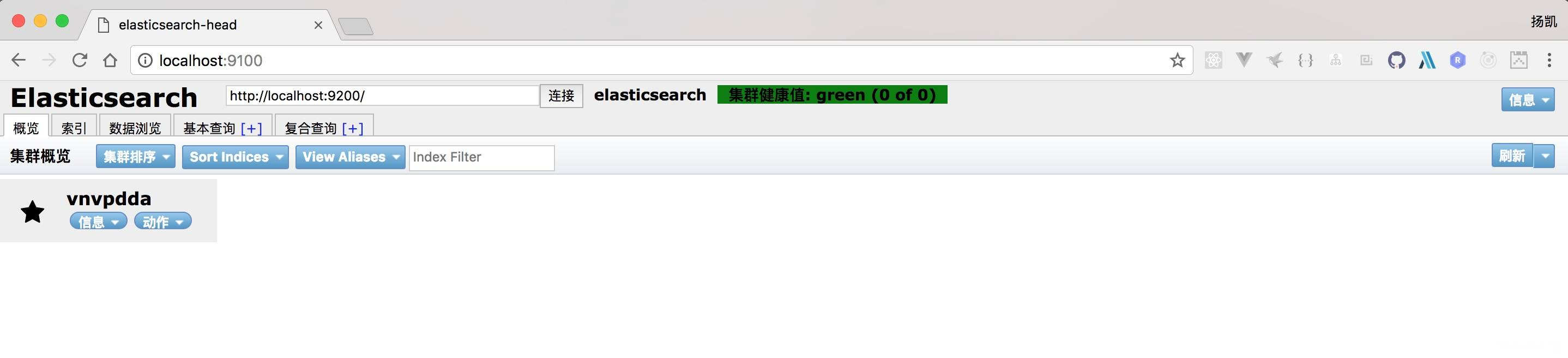
打开浏览器,访问 http://localhost:9100/ ,查看 head 插件运行效果
集成安装
ES 版本 5.x 以上,不支持这种方式安装,如果想使用head插件,请使用独立安装
-
使用ES提供的插件安装方式安装
./bin/plugin install mobz/elasticsearch-head -
打开浏览器,访问 http://localhost:9200/\_plugin/head/ ,查看 head 插件运行效果
1.3.2. ik 中文分词插件
ik 分词插件版本与ES版本对照,请查阅:https://github.com/medcl/elasticsearch-analysis-ik#versions
手动安装
-
在 ES 的 plugins 目录下创建 ik 目录
cd ./plugins && mkdir ik -
下载编译包到 ik 目录,下载地址:https://github.com/medcl/elasticsearch-analysis-ik/releases
-
解压下载的压缩包
unzip elasticsearch-analysis-ik-{ ES 版本 }.zip -
重启 ES
自动安装
-
使用 ES 提供的插件安装方式安装,替换下面的ES 版本,具体信息可以去 https://github.com/medcl/elasticsearch-analysis-ik/releases 查看
./bin/elasticsearch-plugin install https://github.com/medcl/elasticsearch-analysis-ik/releases/download/{ ES 版本 }/elasticsearch-analysis-ik-{ ES 版本 }.zip -
重启 ES
2. 常见错误
错误1:进程虚拟内存
[3]: max virtual memory areas vm.max_map_count [65530] likely too low, increase to at least [262144]vm.max_map_count:限制一个进程可以拥有的VMA(虚拟内存区域)的数量。
切换到root用户,修改配置文件:
vim /etc/sysctl.conf添加下面的内容:
vm.max_map_count=655360然后执行命令:
sysctl -p错误2:文件权限不足
[1]: max file descriptors [4096] for elasticsearch process likely too low, increase to at least [65536]用的是es用户,而不是root,所以文件权限不足。
使用root用户登录
修改配置文件:
vim /etc/security/limits.conf添加下面的内容:
* soft nofile 65536

* hard nofile 131072

* soft nproc 4096

* hard nproc 4096
重启终端窗口
所有错误修改完毕,一定要重启你的终端,否则配置无效。
3. 基础概念
3.1. 集群和节点
每个节点都是一个 ES 的单独实例,通过 node_name 来指定各个节点的名字。
集群是通过配置cluster_name来使得节点找到集群。
3.2. 索引
索引是含有相同属性的文档集合,在 ES 中是通过一个名字来识别的,而且要求是英文字母小写且不包含中划线
索引对应于 SQL 的 database
3.3. 类型
索引可以含有一个或者多个类型,文档必须属于一个类型
类型对应于 SQL 的 table
3.4. 文档
文档是可以被索引的基本数据单位
文档对应于 SQL 的一条记录
3.5. 分片
每个索引都有多个分片,每个分片都是一个 Lucene 索引
3.6. 备份
拷贝一份分片就完成了分片的备份
4. 基本用法
4.1. 请求方式
API 基本格式:http://<ip>:<port>/<索引>/<类型>/<文档 id>
API 请求方式:GET、POST、PUT、DELETE
4.2. 索引
创建
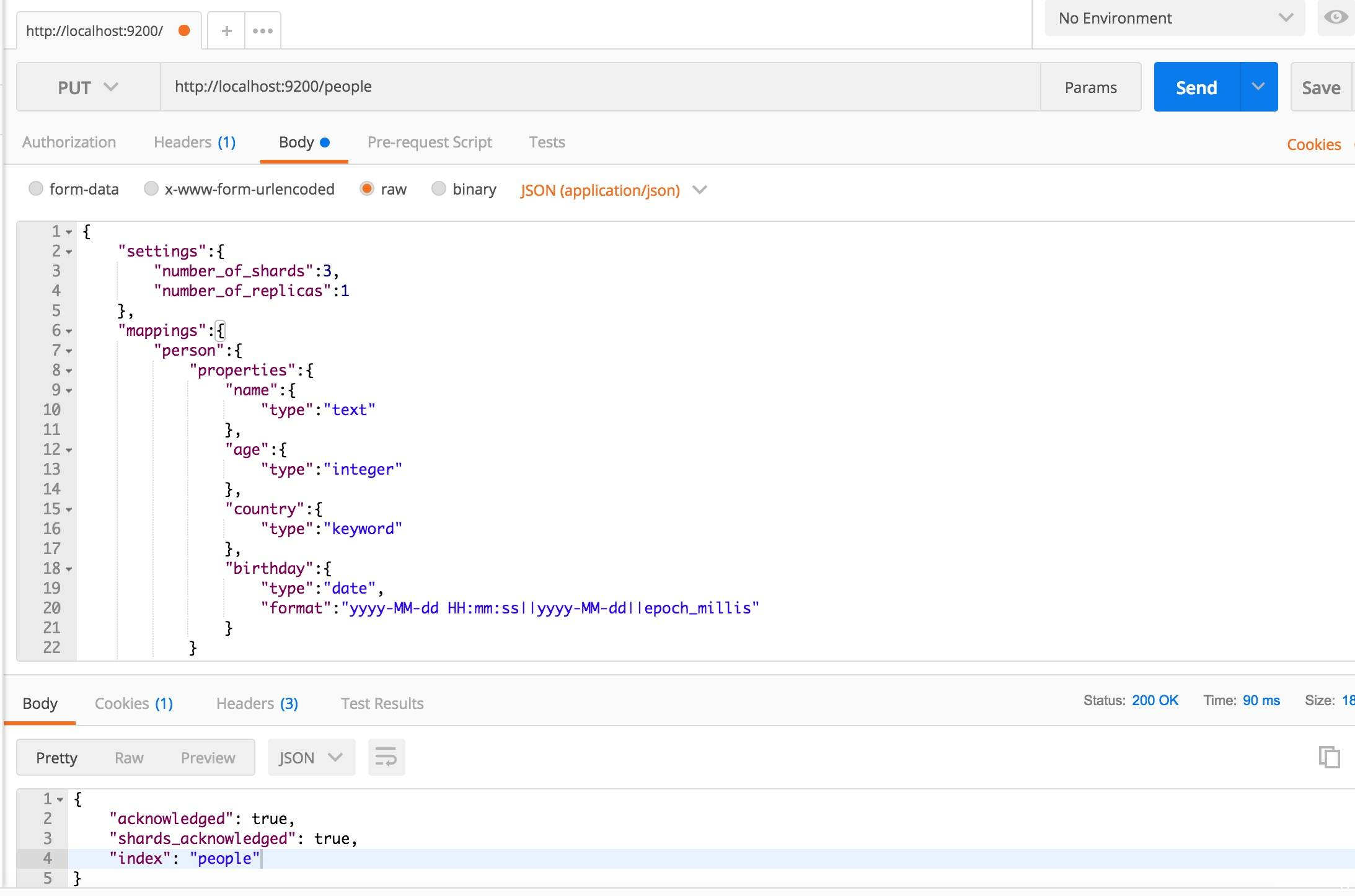
假设创建一个 people 的索引,打开 PostMan,输入地址 http://localhost:9200/people ,将方法改为 PUT 方法,将👇的 json 放入 Body 请求体,点击 Send,若出现 "acknowledged":true,则代表索引创建成功。
请求体的 json:
{
  "settings": {
    "number_of_shards": 3,
    "number_of_replicas": 1
  },
  "mappings": {
    "person": {
      "properties": {
        "name": {
          "type": "text"
        },
        "age": {
          "type": "integer"
        },
        "country": {
          "type": "keyword"
        },
        "birthday": {
          "type": "date",
          "format": "yyyy-MM-dd HH:mm:ss||yyyy-MM-dd||epoch_millis"
        }
      }
    }
  }
}
{% note success %}
json 请求体字段解释:
- settings 字段可以不指定
- number_of_shards 代表分片数(默认为5)
- number_of_replicas 代表备份数(默认为1)
- text 类型的字段搜索时将会被分词
- keyword 类型的字段搜索时将不会被分词
- epoch_millis 类型代表时间戳格式
{% endnote %}
返回值:
{
  "acknowledged": true,
  "shards_acknowledged": true,
  "index": "people"
}
如图所示:
删除
打开 PostMan,输入地址 http://localhost:9200/people ,将方法改为 DELETE 方法,点击 Send。
返回值:
{
  "acknowledged": true
}
4.3. 插入
现在我们向之前创建的类型中添加一条文档记录,插入分为2种方式,一种是指定 ID,一种是不指定 ID,当不指定 ID 时,ID 由 ES 生成。
指定 ID 插入
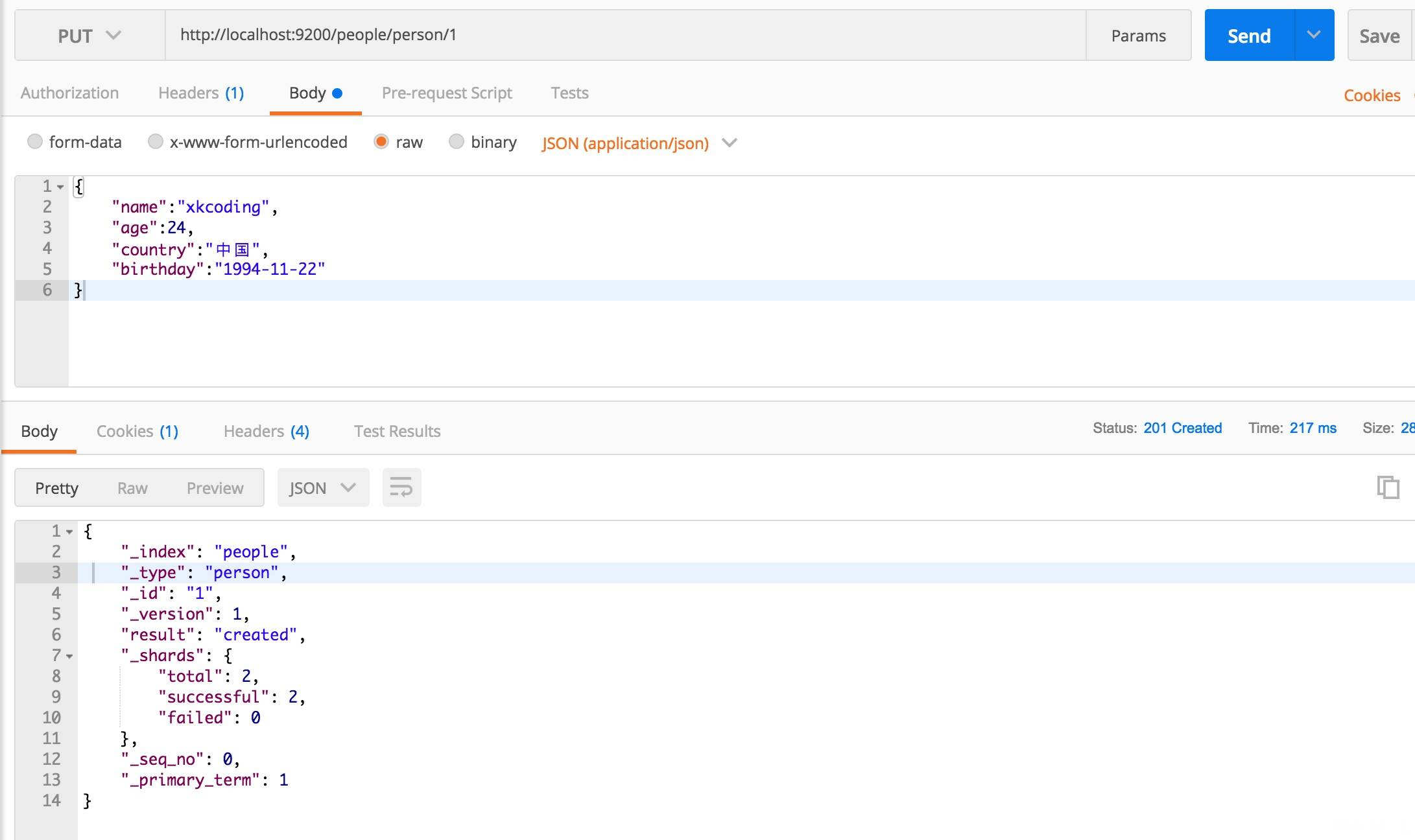
打开 PostMan,输入地址 http://localhost:9200/people/person/1 ,将文档的 json 放入 Body 请求体,将方法改为 PUT 方法,点击 Send。
文档内容:
{
  "name": "xkcoding",
  "age": 24,
  "country": "中国",
  "birthday": "1994-11-22"
}
返回值:
{
  "_index": "people",
  "_type": "person",
  "_id": "1",
  "_version": 1,
  "result": "created",
  "_shards": {
    "total": 2,
    "successful": 2,
    "failed": 0
  },
  "_seq_no": 0,
  "_primary_term": 1
}
如图所示:
不指定 ID 插入
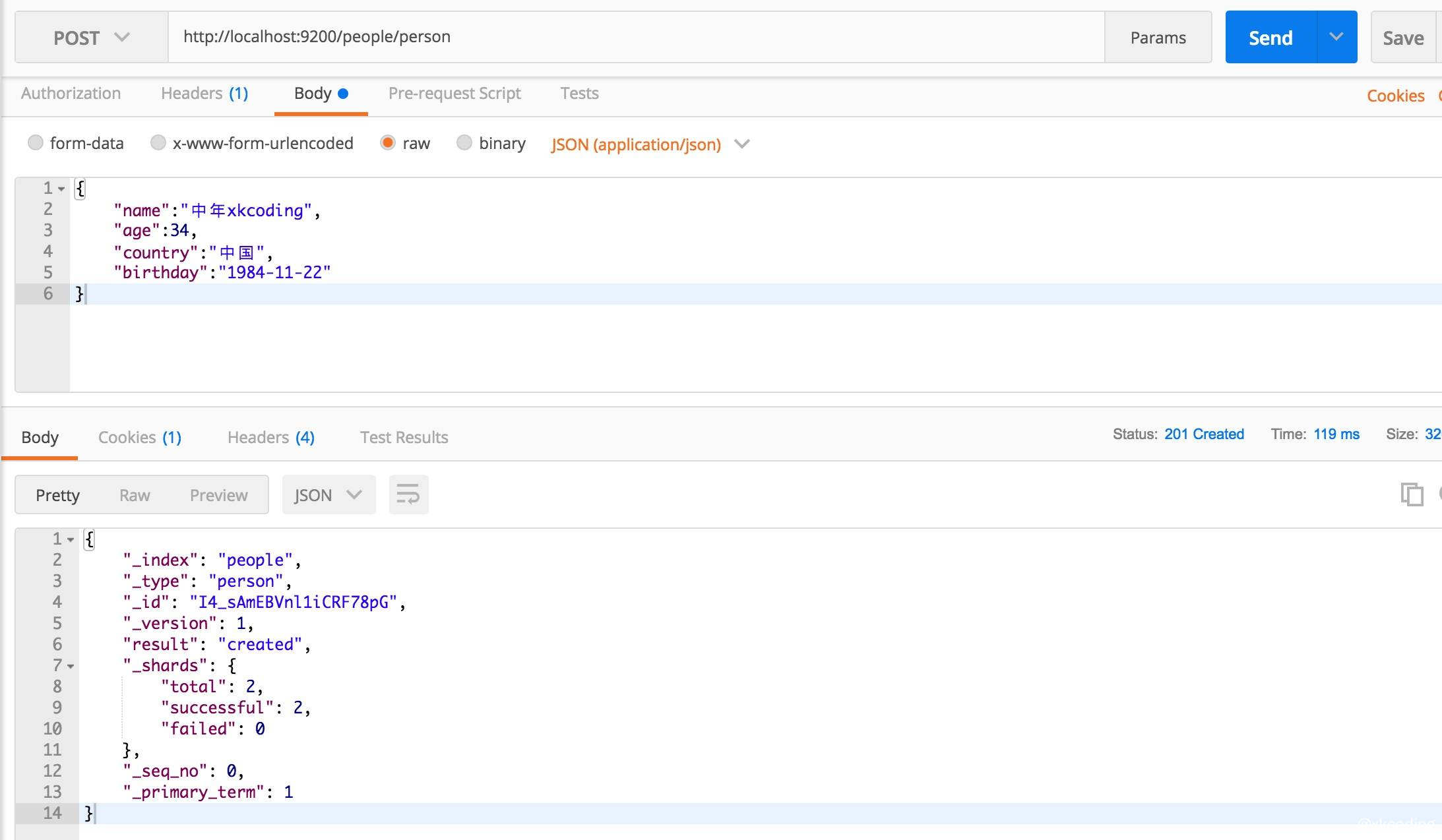
打开 PostMan,输入地址 http://localhost:9200/people/person ,将文档的 json 放入 Body 请求体,将方法改为 POST 方法,点击 Send。
文档内容:
{
  "name": "中年xkcoding",
  "age": 34,
  "country": "中国",
  "birthday": "1984-11-22"
}
返回值:
{
  "_index": "people",
  "_type": "person",
  "_id": "I4_sAmEBVnl1iCRF78pG",
  "_version": 1,
  "result": "created",
  "_shards": {
    "total": 2,
    "successful": 2,
    "failed": 0
  },
  "_seq_no": 0,
  "_primary_term": 1
}
如图所示:
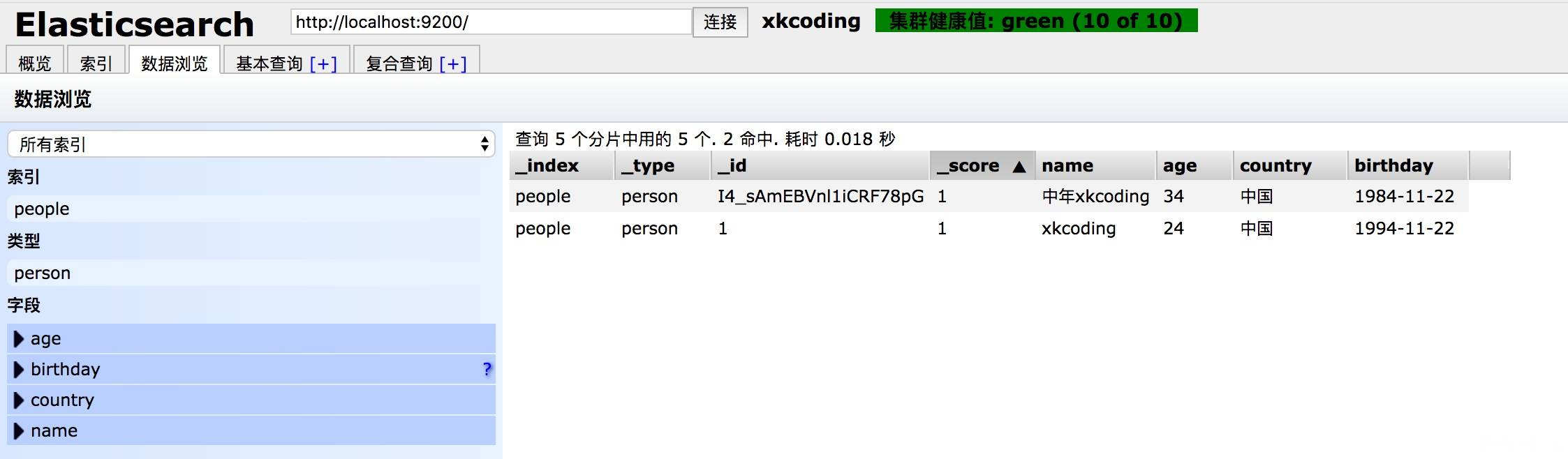
然后前往 head 插件查看是否插入数据
4.4. 修改
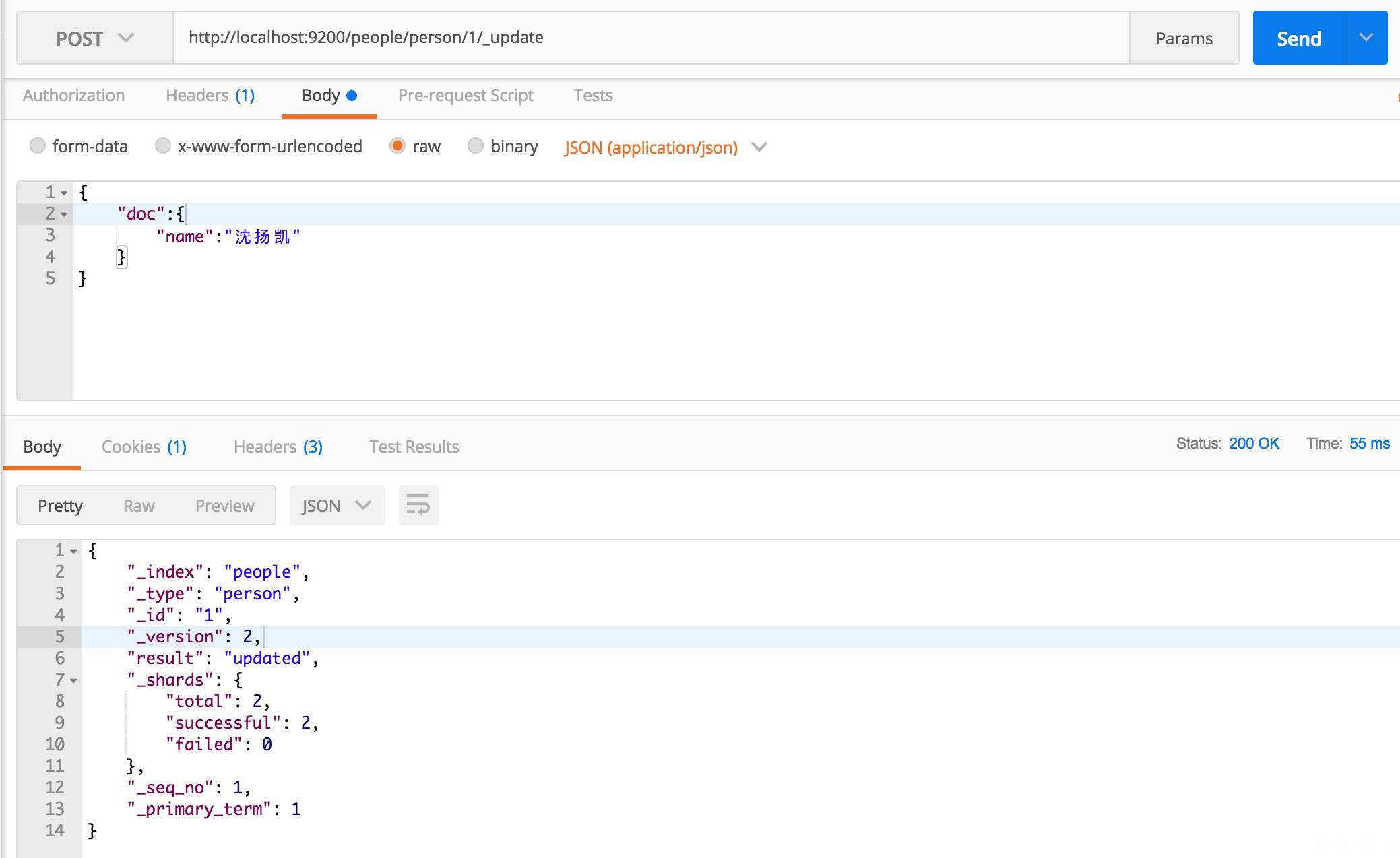
修改文档数据,打开 PostMan,输入地址 http://localhost:9200/people/person/1/\_update ,将请求的 json 放入 Body 请求体,将方法改为 POST 方法,点击 Send。
请求体:
{
  "doc": {
    "name": "沈扬凯"
  }
}
{% note danger %}
注意:修改的时候 URL 必须后面跟_update,然后要修改的字段必须放在 doc 字段里。
{% endnote%}
返回值:
{
  "_index": "people",
  "_type": "person",
  "_id": "1",
  "_version": 2,
  "result": "updated",
  "_shards": {
    "total": 2,
    "successful": 2,
    "failed": 0
  },
  "_seq_no": 1,
  "_primary_term": 1
}
如图所示:
4.5. 删除
打开 PostMan,输入地址 http://localhost:9200/people/person/1 ,将方法改为 DELETE 方法,点击 Send。
返回值:
{
  "_index": "people",
  "_type": "person",
  "_id": "1",
  "_version": 3,
  "result": "deleted",
  "_shards": {
    "total": 2,
    "successful": 2,
    "failed": 0
  },
  "_seq_no": 2,
  "_primary_term": 1
}
4.6. 查询
ES 正如其名,本就是为了 Search 而生,所以查询是 ES 最牛逼的地方。使用上面提到的插入语法,预先插入一堆原始数据,用 head 查看。
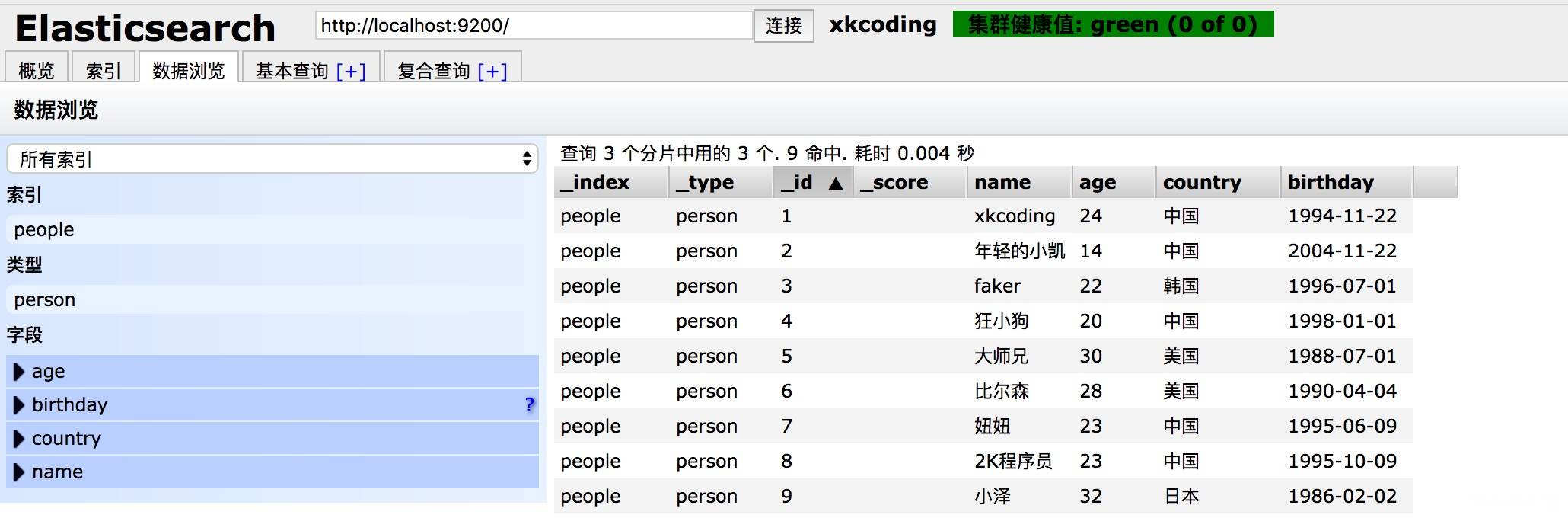
简单查询
打开 PostMan,输入地址 http://localhost:9200/people/person/1 ,将方法改为 GET 方法,点击 Send。
返回 id 为1的文档数据:
{
  "_index": "people",
  "_type": "person",
  "_id": "1",
  "_version": 1,
  "found": true,
  "_source": {
    "name": "xkcoding",
    "age": 24,
    "country": "中国",
    "birthday": "1994-11-22"
  }
}
条件查询
这里还是使用 PostMan 来测试我们的条件查询
请求地址:http://localhost:9200/people/\_search
请求方式:POST
{% note danger %}
返回值因为文章篇幅有限,就不将返回的内容贴在文章中了,请自行测试下方请求体,验证结果
{% endnote %}
-
查询所有文档数据
请求体:
{ "query": { "match_all": {} } } -
分页查询文档数据,第 0 条开始,每页 3 条数据
请求体:
{ "query": { "match_all": {} }, "from": 0, "size": 3 } -
查询名字中包含「小」的文档
请求体:
{ "query": { "match": { "name": "小" } } } -
查询名字中包含「小」的文档,并且按照生日降序排序
请求体:
{
  "query": {
    "match": {
      "name": "小"
    }
  },
  "sort": [
    {
      "birthday": {
        "order": "desc"
      }
    }
  ]
}
聚合查询
请求地址:http://localhost:9200/people/\_search
请求方式:POST
-
按照年龄聚合数据,查出文档中不同年龄所占的人数
请求体:
{ "aggs": { "group_by_age": { "terms": { "field": "age" } } } } -
多个聚合,分别按照年龄、生日聚合数据
请求体:
{ "aggs": { "group_by_age": { "terms": { "field": "age" } }, "group_by_birthday": { "terms": { "field": "birthday" } } } } -
年龄最小
请求体:
{ "aggs": { "grades_ages": { "min": { "field": "age" } } } } -
年龄最大
请求体:
{ "aggs": { "grades_ages": { "max": { "field": "age" } } } } -
平均年龄
请求体:
{ "aggs": { "grades_ages": { "avg": { "field": "age" } } } } -
年龄总和
请求体:
{ "aggs": { "grades_ages": { "sum": { "field": "age" } } } } -
统计,将3、4、5、6的信息统一查询
请求体:
{
  "aggs": {
    "grades_ages": {
      "stats": {
        "field": "age"
      }
    }
  }
}
5. 高级查询
5.1. query
模糊匹配
查询名字中包含「小」的文档
请求体:
{
  "query": {
    "match": {
      "name": "小"
    }
  }
}
词组匹配
查询名字只包含「小凯」的文档,我们先使用如下的请求体查询
{
  "query": {
    "match": {
      "name": "小凯"
    }
  }
}
返回的结果:
// 省略其余部分
"hits": {
  "total": 3,
  "max_score": 1.8386619,
  "hits": [
    {
      "_index": "people",
      "_type": "person",
      "_id": "2",
      "_score": 1.8386619,
      "_source": {
        "name": "年轻的小凯",
        "age": 14,
        "country": "中国",
        "birthday": "2004-11-22"
      }
    },
    {
      "_index": "people",
      "_type": "person",
      "_id": "4",
      "_score": 0.8984401,
      "_source": {
        "name": "狂小狗",
        "age": 20,
        "country": "中国",
        "birthday": "1998-01-01"
      }
    },
    {
      "_index": "people",
      "_type": "person",
      "_id": "9",
      "_score": 0.8142733,
      "_source": {
        "name": "小泽",
        "age": 32,
        "country": "日本",
        "birthday": "1986-02-02"
      }
    }
  ]
}
通过结果,可以发现,通过 match 去查询的时候,ES 返回的是分别包含「小」、「凯」的文档,如何去查询 name 字段只包含「小凯」的文档呢?使用 match_phrase 可以满足要求。
请求体:
{
  "query": {
    "match_phrase": {
      "name": "小凯"
    }
  }
}
字段查询
查询所有的中国人
请求体:
{
  "query": {
    "term": {
      "country": "中国"
    }
  }
}
范围查询(支持数值型和日期型)
查询年龄 24 ≤ age<30 直接的数据
请求体:
{
  "query": {
    "range": {
      "age": {
        "gte": 24,
        "lt": 30
      }
    }
  }
}
5.2. filter
{% note danger%}
一般结合 bool 一起使用,
{% endnote %}
查询年龄为23的文档数据
请求体:
{
  "query": {
    "bool": {
      "filter": {
        "term": {
          "age": 23
        }
      }
    }
  }
}
5.3. 复合条件查询
固定分数查询
-
查询名字中包含「小」的文档,并固定查询分数
请求体:
{ "query": { "constant_score": { "filter": { "match": { "name": "小" } } } } } -
查询名字中包含「小」的文档,并固定查询分数为2
请求体:
{
  "query": {
    "constant_score": {
      "filter": {
        "match": {
          "name": "小"
        }
      },
      "boost": 2
    }
  }
}
布尔查询
-
查询是国家为中国或者年龄为30的数据
请求体:
{ "query": { "bool": { "should": [ { "match": { "country": "中国" } }, { "match": { "age": 30 } } ] } } } -
查询国家为中国并且年龄为23的数据
请求体:
{ "query": { "bool": { "must": [ { "match": { "country": "中国" } }, { "match": { "age": 23 } } ] } } } -
查询国家为中国并且年龄为23并且生日比1995-07-01早的数据
请求体:
{
  "query": {
    "bool": {
      "must": [
        {
          "match": {
            "country": "中国"
          }
        },
        {
          "match": {
            "age": 23
          }
        }
      ],
      "filter": [
        {
          "range": {
            "birthday": {
              "lt": "1995-07-01"
            }
          }
        }
      ]
    }
  }
}
6. Spring Boot 集成 ES
{% note success %}
代码托管在 GitHub:戳我获取源码
{% endnote %}
6.1. Spring Boot 集成 ES 的配置类
在 Spring Boot 中配置类需要使用 @Configuration 来标注
application.yml
server:
  port: 8080
  context-path: /demo
elasticsearch:
  host: 127.0.0.1
  port: 9300
  cluster:
    name: xkcoding
ElasticSearchConfig.java
package com.xkcoding.springbootdemoelasticsearch.config;

import org.elasticsearch.client.transport.TransportClient;
import org.elasticsearch.common.settings.Settings;
import org.elasticsearch.common.transport.TransportAddress;
import org.elasticsearch.transport.client.PreBuiltTransportClient;
import org.springframework.beans.factory.annotation.Value;
import org.springframework.context.annotation.Bean;
import org.springframework.context.annotation.Configuration;

import java.net.InetAddress;
import java.net.UnknownHostException;

/**
 * <p>
 * ES 的配置类
 * </p>
 *
 * @package: com.xkcoding.springbootdemoelasticsearch.config
 * @description: ES 的配置类
 * @author: yangkai.shen
 * @date: Created in 2018/1/18 下午4:41
 * @copyright: Copyright (c) 2018
 * @version: 0.0.1
 * @modified: yangkai.shen
 */
@Configuration
public class ElasticSearchConfig {
	@Value("${elasticsearch.host}")
	private String host;

	@Value("${elasticsearch.port}")
	private int port;

	@Value("${elasticsearch.cluster.name}")
	private String clusterName;

	@Bean
	public TransportClient esClient() throws UnknownHostException {
		Settings settings = Settings.builder().put("cluster.name", this.clusterName).put("client.transport.sniff", true).build();

		TransportAddress master = new TransportAddress(InetAddress.getByName(host), port);
		TransportClient client = new PreBuiltTransportClient(settings).addTransportAddress(master);
		return client;
	}
}
6.2. 插入
/**
 * 插入一条数据到 ES 中,id 由 ES 生成
 *
 * @param name     名称
 * @param country  国籍
 * @param age      年龄
 * @param birthday 生日
 * @return 插入数据的主键
 */
@PostMapping("/person")
public ApiResponse add(@RequestParam String name,
                       @RequestParam String country,
                       @RequestParam Integer age,
                       @RequestParam @DateTimeFormat(pattern = "yyyy-MM-dd HH:mm:ss") Date birthday) {
	try {
		XContentBuilder content = XContentFactory.jsonBuilder()
				.startObject()
				.field("name", name)
				.field("country", country)
				.field("age", age)
				.field("birthday", birthday.getTime())
				.endObject();

		IndexResponse response = esClient.prepareIndex(INDEX, TYPE).setSource(content).get();
		return ApiResponse.ofSuccess(response.getId());
	} catch (IOException e) {
		e.printStackTrace();
		return ApiResponse.ofStatus(Status.INTERNAL_SERVER_ERROR);
	}
}
6.3. 修改
/**
 * 根据主键,修改传递字段对应的值
 *
 * @param id       ES 中的 id
 * @param name     姓名
 * @param country  国籍
 * @param age      年龄
 * @param birthday 生日
 * @return UPDATED 代表文档修改成功
 */
@PutMapping("/person/{id}")
public ApiResponse update(@PathVariable String id,
                          @RequestParam(value = "name", required = false) String name,
                          @RequestParam(value = "country", required = false) String country,
                          @RequestParam(value = "age", required = false) Integer age,
                          @RequestParam(value = "birthday", required = false) @DateTimeFormat(pattern = "yyyy-MM-dd HH:mm:ss") Date birthday) {
	UpdateRequest request = new UpdateRequest(INDEX, TYPE, id);
	try {
		XContentBuilder builder = XContentFactory.jsonBuilder().startObject();
		if (!Strings.isNullOrEmpty(name)) {
			builder.field("name", name);
		}
		if (!Strings.isNullOrEmpty(country)) {
			builder.field("country", country);
		}
		if (age != null && age > 0) {
			builder.field("age", age);
		}
		if (birthday != null) {
			builder.field("birthday", birthday.getTime());
		}
		builder.endObject();
		request.doc(builder);
	} catch (IOException e) {
		e.printStackTrace();
		return ApiResponse.ofStatus(Status.INTERNAL_SERVER_ERROR);
	}
	try {
		UpdateResponse response = esClient.update(request).get();
		return ApiResponse.ofSuccess(response);
	} catch (Exception e) {
		e.printStackTrace();
		return ApiResponse.ofStatus(Status.INTERNAL_SERVER_ERROR);
	}
}
6.4. 删除
/**
 * 根据 id 删除 ES 的一条记录
 *
 * @param id ES 中的 id
 * @return DELETED 代表删除
 */
@DeleteMapping("/person/{id}")
public ApiResponse delete(@PathVariable String id) {
	DeleteResponse response = esClient.prepareDelete(INDEX, TYPE, id).get();
	return ApiResponse.ofSuccess(response.getResult());
}
6.5. 简单查询
/**
 * 简单查询 根据 id 查 ES 中的文档内容
 *
 * @param id ES 中存储的 id
 * @return 对应 id 的文档内容
 */
@GetMapping("/person/{id}")
public ApiResponse get(@PathVariable String id) {
	GetResponse response = esClient.prepareGet(INDEX, TYPE, id).get();
	if (!response.isExists() || response.isSourceEmpty()) {
		return ApiResponse.ofStatus(Status.NOT_FOUND);
	}
	return ApiResponse.ofSuccess(response.getSource());
}
6.6. 复合查询
/**
 * 复合查询,根据传进来的条件,查询具体内容
 *
 * @param name    根据姓名匹配
 * @param country 根据国籍匹配
 * @param gtAge   大于年龄
 * @param ltAge   小于年龄
 * @return 满足条件的文档内容
 */
@PostMapping("/person/query")
public ApiResponse query(@RequestParam(value = "name", required = false) String name,
                         @RequestParam(value = "country", required = false) String country,
                         @RequestParam(value = "gt_age", defaultValue = "0") int gtAge,
                         @RequestParam(value = "lt_age", required = false) Integer ltAge) {
	BoolQueryBuilder boolQueryBuilder = QueryBuilders.boolQuery();

	if (!Strings.isNullOrEmpty(name)) {
		boolQueryBuilder.must(QueryBuilders.matchQuery("name", name));
	}

	if (!Strings.isNullOrEmpty(country)) {
		boolQueryBuilder.must(QueryBuilders.matchQuery("country", country));
	}

	RangeQueryBuilder rangeQueryBuilder = QueryBuilders.rangeQuery("age").from(gtAge);

	if (ltAge != null && ltAge > 0) {
		rangeQueryBuilder.to(ltAge);
	}

	boolQueryBuilder.filter(rangeQueryBuilder);

	SearchRequestBuilder searchRequestBuilder = esClient.prepareSearch(INDEX)
			.setTypes(TYPE)
			.setSearchType(SearchType.DFS_QUERY_THEN_FETCH)
			.setQuery(boolQueryBuilder)
			.setFrom(0)
			.setSize(20);

	log.info("【query】:{}", searchRequestBuilder);

	SearchResponse searchResponse = searchRequestBuilder.get();
	List<Map<String, Object>> result = Lists.newArrayList();
	searchResponse.getHits().forEach(hit -> {
		result.add(hit.getSourceAsMap());
	});

	return ApiResponse.ofSuccess(result);
}
6.8. 搜索建议(有时间补充)
6.7. 聚合查询(有时间补充)
7. 结语
ElasticSearch 在现在是一个应用十分广泛,且火热的技术,本文只是我在入门 ES 的一点小小的记录,更多 ES 的专业知识,优化技巧,还需要大量的学习与实践!
推荐学习地址:
